switek email

sales06@switek.biz

switek whatsapp

+86 186 5927 5869

Subscript to Us

.
SWITEK IML Robot Instruction -- SigmaTek -- Variables

High Speed Siden Entry IML Robot SW833-S6

SWITEK IML Robot Instruction -- SigmaTek -- Variables

Abstract

With the control system developed by the Austria automatic company SIGMATEK GmbH & Co KG, SWITEK high speed side entry IML robot is providing a more efficient and outstanding performance for your quality bulk production of the IML Yogurt Cups.

1.3 Function Screen

1.3.16 Variables

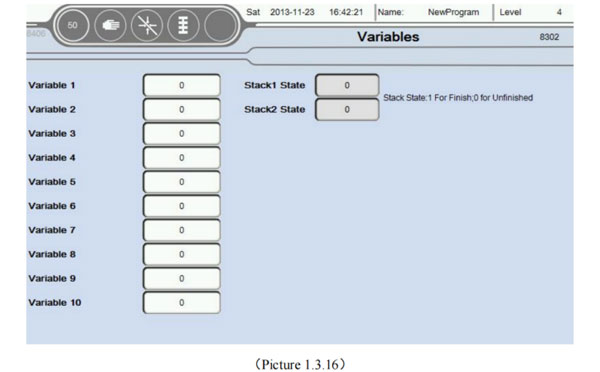
At the Function screen, select the Variables button to enter this page, as the picture below 1.3.16;
iml robot control system
  1. There are ten variables you can use in a Teaching program, can be used for signs, statistics, etc. Another multiple vacuum, input, output signal monitoring.
  2. At the same time the user can click on an empty area behind the variable renaming variables, facilitate the teaching mode identification of variables;
  3. Stack state: 1 means stack is finish, 0 is not finish.

1.3.17 Axis Configuration

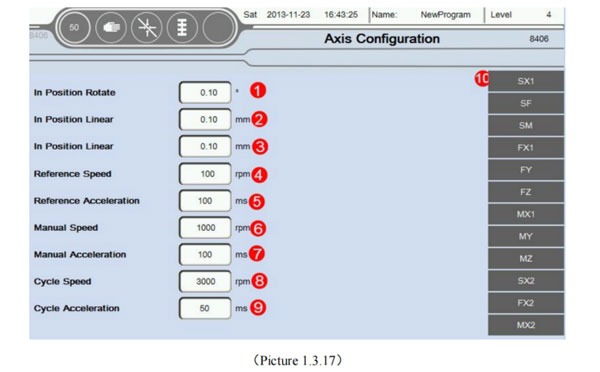
Select the Back button return to the menu interface, Choose Axis Configuration button into this page, as the picture below 1.3.17:
iml robot control system
  1. In position Rotate: If the unit is running servo axis angle, determine the minimum angle of deviation is in place. For example, if you want to rotate 30°, here is set to 0.10°, then when the servo to 29.9°, system default that has been in place. The remaining 0.1° with the next step to run together;
  2. In position Linear: Running unit is mm, determine whether the minimum position deviation in place. For example: If you want to move a 30mm, this set is 0.10mm, then, when the servo to 29.90mm. System default that has been in place. The remaining 0.1mm with the next step to run together;
  3. In position Linear: Running unit is mm, determine whether the minimum position deviation in place. For example: If you want to move a 30mm. This set is 0.10mm, then, when the servo to 29.90mm. System Default that has been in place. The remaining 0.1mm with the next step to run together;
    Attention: This place interval and teaching program in place each icon editing interface consistent intervals. The default value of the program between the two major party in place interval setting.
  4. Reference Speed: Return to the Home when the macimum speed of the motor. Unit is RPM (r/min)
  5. Reference Acceleration: Return to the HOme when the acceleration of the motor.Unit is ms (millisecond). Attention, the shorter the accelelration time acceleration is bigger.
  6. Manual speed: Manual mode the maximum run speed of the motor. Unit is RPM (r/min).
  7. Manual Acceleration: Manual mode the maximum run acceleration of the motor. Unit is ms (millisecond). Attention, the shorter the acceleration time acceleration is bigger.
  8. Cycle Speed: Automatic mode maximum running speed of the motor. Unit is RPM (r/min)
  9. Cycle Acceleration: The acceleration of time can't more than the set value when run automatically.
    Attention: Of the speed/acceleration limiting, servo motor running parameters Settings interface with maximum revolutions. Program defaults to the smaller one between the two values is the highes speed.
  10. Servo axis status information: Can click on the following
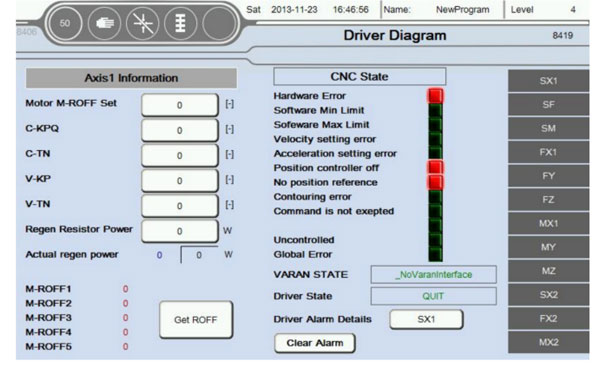
    Click "SX", Enter the current picture, as the picture below 1.3.18;
    iml robot control system

    Information in a servo axis parameters to automatically read. Don't need to be set. Suggested that only when the default parameters inapplicable, to modify carefully.
    Attention:
    1. When all the parameters to 0 before restart automatically read the system default parameters (Mainly used in the case of parameter change chaos, other situations without modification). If these parameters are not very accurate, can be set automatically according to the actual running situation of motor. Such that the zero angle of motor is not accurate, can click on the button get zero. Then write into motor M-ROFF setting;
    2. When ** axis is pulse type servo, you don't need to set up and read the parameter information and status.
      CNC Status
      Hardward Error: Servo drive hardware error;
      Softward Min Limit: Axis is beyond of software minimum position setting (Servo operation parameters settings);
      Software Max Limit: Axis is beyond of software maximum position setting (Servo operation parameters settings);
      Velocity Setting Error: Actual speed exceeds the speed of the motor setting;
      Acceleration Setting Error: Actual Acceleration exceeds the Acceleration of the motor setting;
      Position controller off: Close enable or position control;
      No position reference: Didn't finish the reference action;
      Contouring error: Axis actual position beyond set deviation;
      Command error: The instructions are not allowed to perform;
      Idle position: Actual position error, idle position;
      Uncontrolled: Can't control the action;
      Other error:


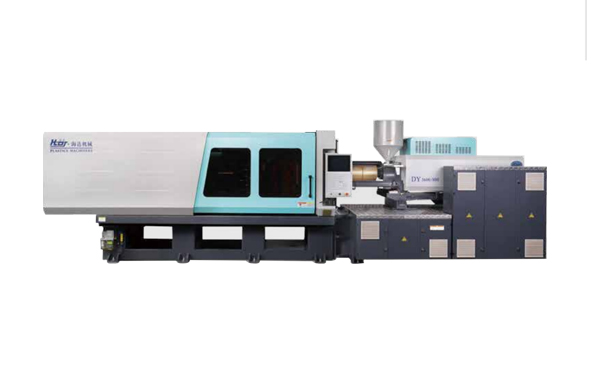
Hybrid Injection Molding Machine for Laboratory Consumable Petri Dish Injection Molding -- HD260KDY
Haida hybrid Injection Molding Machine
HD260KDY

HD260KDY -- HaiDa Hybrid Injection Molding Machine

No. Name Value
1 Clamping Force 2600 kN
2 Shot Weight 326 g
3 Shot Speed 350 mm/s
4 Screw Diameter 45 mm
5 Opening Stroke 500 mm
6 Space Between Tie Bars 570 x 520 mm
7 Mold Thickness (Min) 200 mm
8 Mold Thickness (Max) 560 mm
9 Pumper Motor 115 kW
10 Heating Capacity 18 kW

Injection Automation Application -- Side Entry Petri Dishs Injection Molding Automation Solution
petri dish packing solution

SIDE ENTRY PETRI DISH PACKING SOLUTION

Introduction of SWITEK Side Entry Petri Dish Packing System

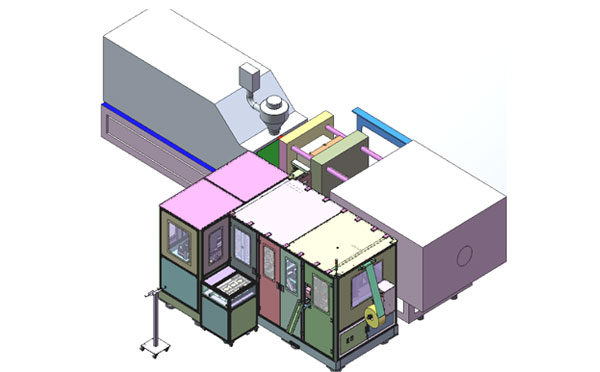
The SWITEK side entry petri dish packing system is a custom made automation system for the stable production of laboratory consumable plastic petri dish with the picking robot, the petri dish assembly, stacking, packing unit etc. integrated as auniformed system for the efficient and stable production of the petri dish. The system can be custome made for a petri dish mold layout design of 2+2, 4+4, 6+6, 8+8 etc.
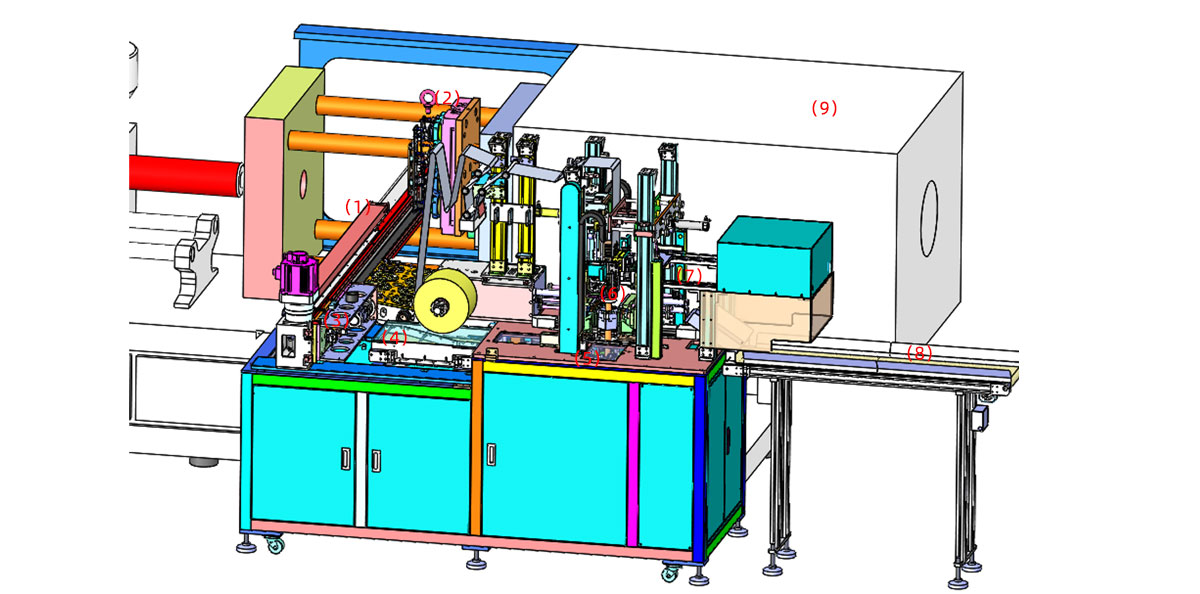
Functional Units of SWITEK Top Entry Petri Dish Packing System
petri dish packing solution
  • (1) -- Side Entry Robotic Arm: The picking arm of the packing system in handling the picking of the petri dish from the injection molding machine and place them on the assembly unit.
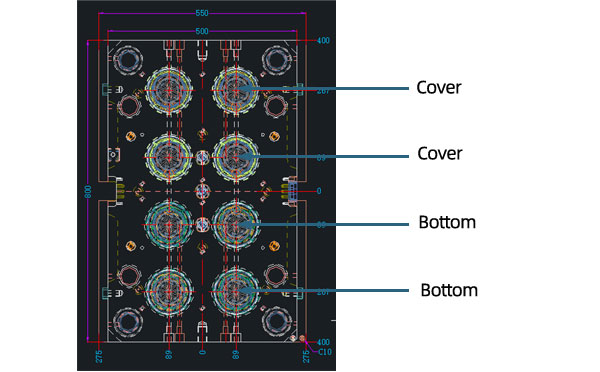
  • (2) -- Injection Mold: The core injection unit to shape the petri dish, it can be 2+2, 4+4, 6+6, 8+8 configuragion of the petri covers and bottoms.
  • (3) -- Petri Dish Assembly Unit: Have the cover and bottom of the petri dish assembled and drop it on the conveyor.
  • (4) -- Sorting Conveyor: Lined the assembled petri dish sets for stacking before packing.
  • (5) -- Stacking Station: Have the well assembled petri dishes stacked up as requested (5/10/15/20/25 sets etc.).
  • (6) -- Petri Dish Packing Unit: Have the well stacked petri dish packed and sealed with optional function of vacuume the bag.
  • (7) -- Petri Dish Transfer Robot: Catch the well sealed petri dish bag and drop it to the conveyor.
  • (8) -- Petri Dish Dropping Conveyor: Deliver the well packed petri dish.
  • (9) -- Injection Molding Machine: The injection unit of the whole syste.

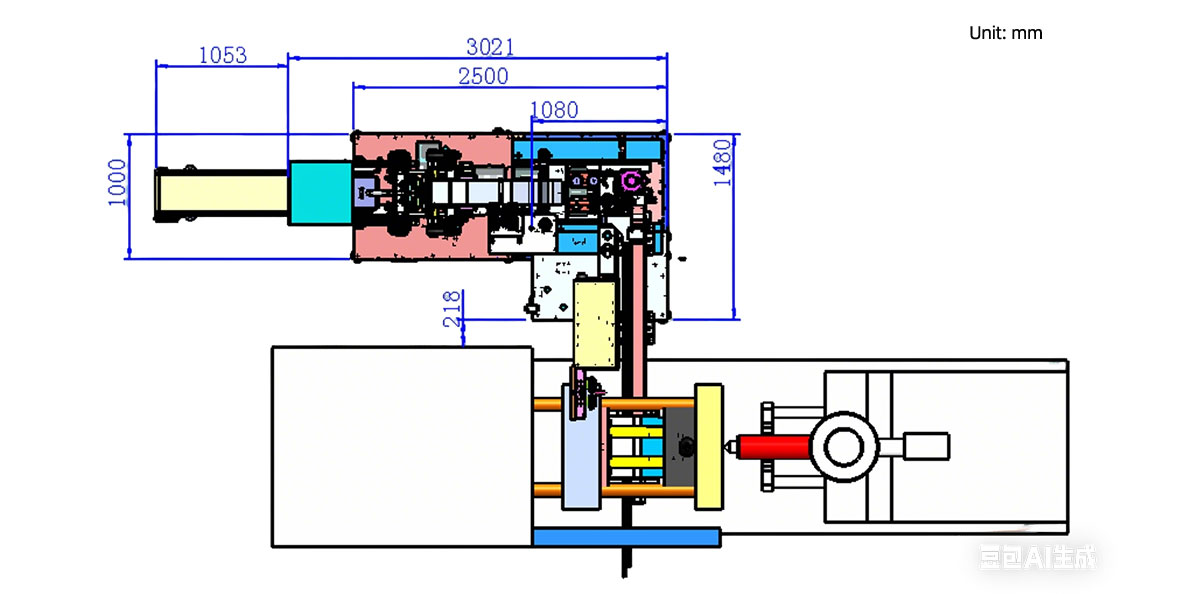
Installation Dimension of SWITEK Side Entry Petri Dish Packing System
petri dish packing solution

Productivity of SWITEK Side Entry Petri Dish Packing Solutions
    Vacuumed Sleeve Packing
  • 10 Sets/Bag --Injection Cycle time: 9s
  • 20 Sets/Bag --Injection cycle: 6s
  • 25 Sets/Bag --Injection Cycle: 5.5s
    Non-vacuumed Sleeve Packing
  • 10 Sets/Bag --Injection Cycle time: 6.5s
  • 20 Sets/Bag --Injection cycle: 6s
  • 25 Sets/Bag --Injection Cycle: 5.5s

Mold Layout Design & Sleeve Size for the Petri Dish Packing System
petri dish packing solution

Mold Layout Deisgn

petri dish packing solution

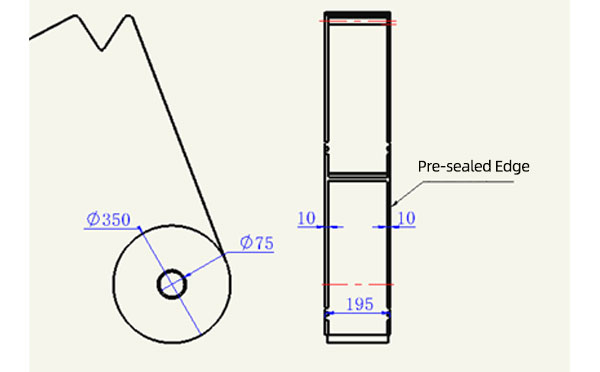
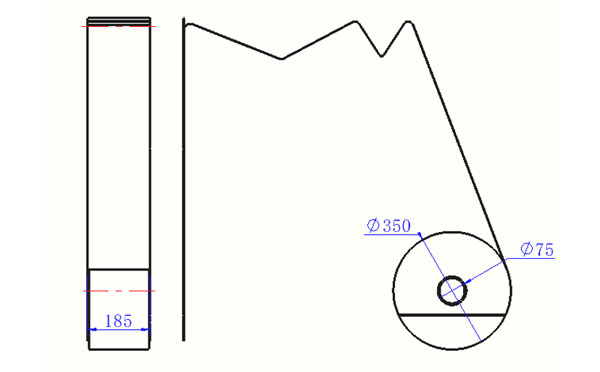
Sleeve Size for Package with Vacuum Request
petri dish packing solution

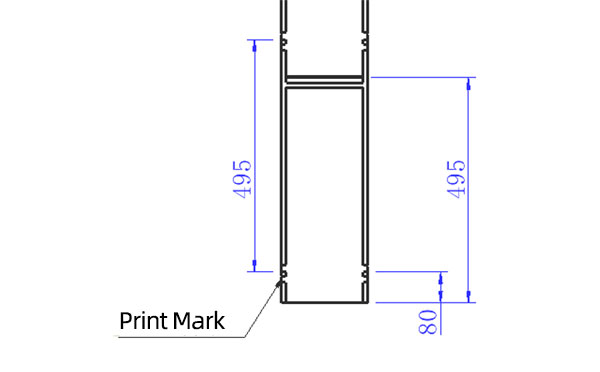
Sleeve Size for Package without Vacuum Request
petri dish packing solution

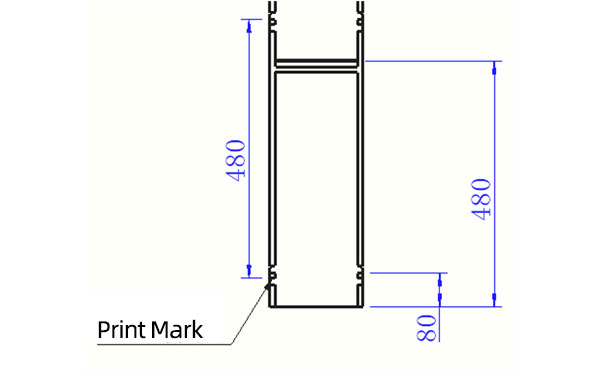
Sleeve (With Mark) Size for Package with Vacuum Request
petri dish packing solution

Sleeve (With Mark) Size for Package without Vacuum Request

I think you'll have an overall understanding about the SWITEK top/side entry petri dish packing system. If you still have any other question about it or need any help in your petri dish production project, please feel free to contact SWITEK laboratory consumable plastic parts injection molding solutions team for more information.


Email: sales06@switek.biz

WhatsApp

WeChat


Request for Quotation Now
Submit