
sales06@switek.biz

+86 186 5927 5869

Subscript to Us
sales06@switek.biz
+86 186 5927 5869
Subscript to Us

Keywords:Panasonic A6 Servo Installation Instruction, Panasonic A6 Driver, Panasonic A6 Series Servo Motor Manual
You can perform position control based on the positional command (pulse train) from the host controller. This section describes the fundamental setup to be used for the position control.
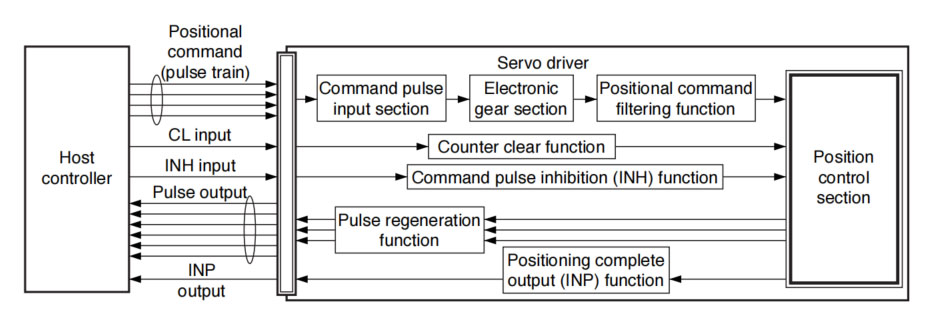
The positional commands of the following 3 types (pulse train) are available.
Set the pulse configuration and pulse counting method based on the specification and configuration of installation of the host controller.
The input terminals can accommodate the following 2 systems.
For line driver output, "Input 2" can also be used without changing the allowable input frequency.
• Relevant parameters
| Parameter | Title | Range | Function |
|---|---|---|---|
| Pr0.05 | Selection of command pulse input | 0 to 2 | You can select either the photocoupler input or the exclusive input for line driver as the command pulse input. 0:Photocoupler input (PULS1, PULS2, SIGN1, SIGN2) 1:Exclusive input for the driver (PULSH1, PULSH2, SIGNH1, SIGNH2) 2:Photocoupler input (PULS1, PULS2, SIGN1, SIGN2) [250 kpulse/s or less] |
| Pr0.06 | Command pulse rotational direction setup | 0 to 1 | Sets the counting direction when command pulse is input. |
| Pr0.07 | Command pulse input mode setup | 0 to 3 | Sets the counting method when command pulse is input. |
This function multiplies the input pulse command from the host controller by the pre-determined driving or multiplying factor and applies the result to the position control section as the positional command. By using this function, desired motor rotations or movement distance per unit input command pulse can be set; or the command pulse frequency can be increased if the desired motor speed cannot be obtained due to limited pulse output capacity of the host controller.
• Relevant parameters
| Parameter No. | Title | Range | Function |
|---|---|---|---|
| Pr0.08 | Command pulse counts per one motor revolution | 0 to 8388608 | Set the command pulses that causes signle turn of the motor shaft. |
| Pr0.09 | 1st numerator of electronic gear | 0 to 1073741824 | Set the numerator of division/multiplication operation made according to the command pulse input. |
| Pr0.10 | Denominator of electronic gear | 1 to 1073741824 | Set the denominator of division/multiplication operation made according to the command pulse input. |
| Parameter No. | Title | Range | Function |
|---|---|---|---|
| Pr0.08 | Command pulse counts per one motor revolution | 0 to 8388608 | Set the command pulses taht causes single turn of the motor shaft. |
| Pr0.09 | 1st numerator of electronic gear | 1 to 1073741824 | Set the Denominator of division/multiplication operation made according to the command pulse input. |
| Pr0.10 | Denominator of electronic gear | 1 to 1073741824 | Set the denominator of division/multiplication operation made according to the command pulse input. |
To make the positional command divided or multiplied by the electronic gear smooth, set the command filter.
• Relevant parameters
| Parameter No. | Title | Range | Unit | Function |
|---|---|---|---|---|
| Pr2.22 | Positional command smoothing filter | 0 to 10000 | 0.1ms | Set up the time constant of the 1st delay filter in response to the positional command. |
| Pr2.23 | Positional command FIR filter | 0 to 10000 | 0.1ms | Set up the time constant of the 1st delay filter in response to the positional command. |
The information on the amount of movement can be sent to the host controller in the form A- and B-phase pulses from the servo driver. When the output source is the encoder, Z-phase signal is output once per motor revolution; or if the feedback scale, the signal is output at absoute zero position. The output resolution, B-phase logic and output source (encoder or external scale) can be set with parameters.
• Relevant parameters
| Parameter No. | Title | Range | Unit | Function |
|---|---|---|---|---|
| Pr0.11 | Output pulse counts per one motor revolution | 1 to 2097152 | P/r | You can set up the output pulse counts per one motor revolution for each OA and OB with the Pr0.11 setup. |
| Pr0.12 | Reversal of pulse output logic | 0 to 3 | — | You can set up the B-phase logic and the output source of the pulse output. With this parameter, you can reverse the phase relation between the A-phase pulse and the B-phase pulse by reversing the B-phase logic. |
| Pr5.03 | Denominator of pulse output division | 0 to 8388608 | — | For application where the number of pulse per revolution is not an integer, this parameter can be set to a value other than 0, and the dividing rating ratio can be set by setting numerator of division to Pr0.11 and denominator of division to Pr5.03. |
| Pr5.33 | >Pulse regenerative output imit setup | 0 to 1 | — | Enable/disable detection of Err28.0 Pulse regenerative limit protection. |
| Pr6.20 | Z-phase setup of external scale | 0 to 400 | μs | Set up the Z phase regenerative width of feedback scale in unit of time |
| Pr6.21 | Serial absolute external scale Z phase setup | 0 to 268435456 | pulse | Full-closed control using serial absolute feedback scale. When outputting pulses by using the feedback scale as the source of the output, set the Z phase output interval in units of A phase output pulses of the feedbackk scales (before multiplied by 4). |
| Pr6.22 | A, B phase external scale pulse output method selection | 0 to 1 | — | Select the pulse regeneration method of A, B and Z parallel feedback scale. |
The deviation counter clear input (CL) clears the counts of positional deviation counter at the position control to 0.
• Relevant parameters
| Parameter No. | Title | Range | Function |
|---|---|---|---|
| Pr5.17 | Counter clear input mode | 0 to 4 | You can set up the clearing conditions of the counter clear input signal. |
The completion of positioning can be verified by the positioning complete output (INP). When the absolute value of the positional deviation counter at the position control is equal to or below the positioning complete range by the parameter, the output is ON. Presence and absence of positional command can be specified as one of judgment conditions.
• Relevant parameters
| Parameter No. | Title | Range | Unit | Function |
|---|---|---|---|---|
| Pr4.31 | Position complete (In-position) range | 0 to 2097152 | Command unit | Set up the timing of positional deviation at which the positioning complete signal (INP1) is output. |
| Pr4.32 | Positioning complete (In-position) output setup | 0 to 10 | — | Select the condition to output the positioning complete signal (INP1). |
| Pr4.33 | INP hold time | 0 to 30000 | 1 ms | Set up the hold time when Pr4.32 Positioning complete output setup = 3. |
| Pr4.42 | 2nd Positioning complete (In-position) range | 0 to 2097152 | Command unit | Set up the timing of positional deviation at which the positioning complete signal (INP2) is output. |
The command pulse input counting process can be forcibly terminated by using the command pulse inhibit input signal (INH). When INH input is ON, the servo driver ignorses the command pulse, disabling pulse counting function. At then, A large number of pulses of the positional command filter function and the command frequency mulitiplication function is cleared.
The default setting of this inhibition function is disable. To use INH function, change the setting of Pr5.18 "Invalidation of command pulse prohibition input".
• Relevant parameters
| Parameter No. | Title | Range | Function |
|---|---|---|---|
| Pr5.18 | Invalidation of command pulse inhibit input | 0 to 1 | Select command pulse inhibit input enable/disable. |
| Pr5.19 | Command pulse inhibit input reading setup | 0 to 5 | Select command pulse inhibit input enable/disable signal reading period. When the status of several signals read during the predetermined reading period are same, update the signal status. |
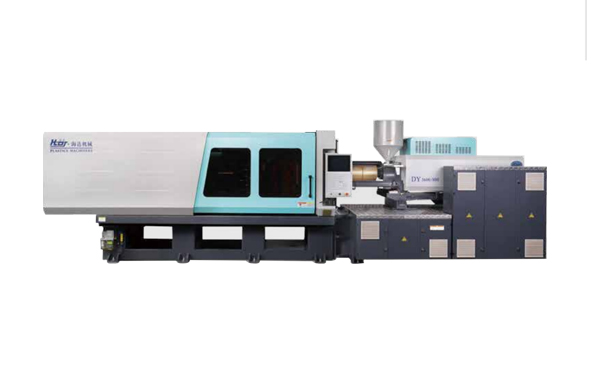
HD100LDY -- HaiDa Hybrid Injection Molding Machine
| No. | Name | Value |
|---|---|---|
| 1 | Clamping Force | 1000 kN |
| 2 | Shot Weight | 55 g |
| 3 | Shot Speed | 200 mm/s |
| 4 | Screw Diameter | 26 mm |
| 5 | Opening Stroke | 330 mm |
| 6 | Space Between Tie Bars | 370 x 370 mm |
| 7 | Mold Thickness (Min) | 140 mm |
| 8 | Mold Thickness (Max) | 380 mm |
| 9 | Pumper Motor | 34 kW |
| 10 | Heating Capacity | 5 kW |
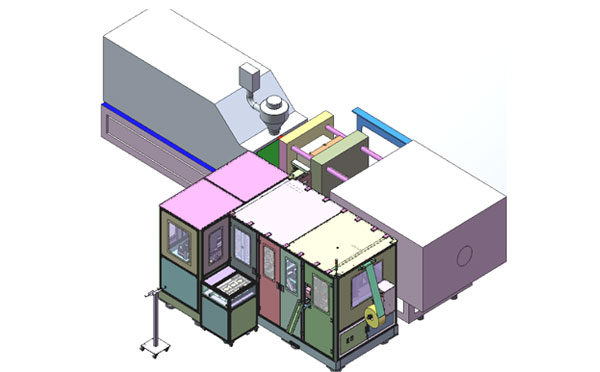
The SWITEK side entry petri dish packing system is a custom made automation system for the stable production of laboratory consumable plastic petri dish with the picking robot, the petri dish assembly, stacking, packing unit etc. integrated as auniformed system for the efficient and stable production of the petri dish. The system can be custome made for a petri dish mold layout design of 2+2, 4+4, 6+6, 8+8 etc.
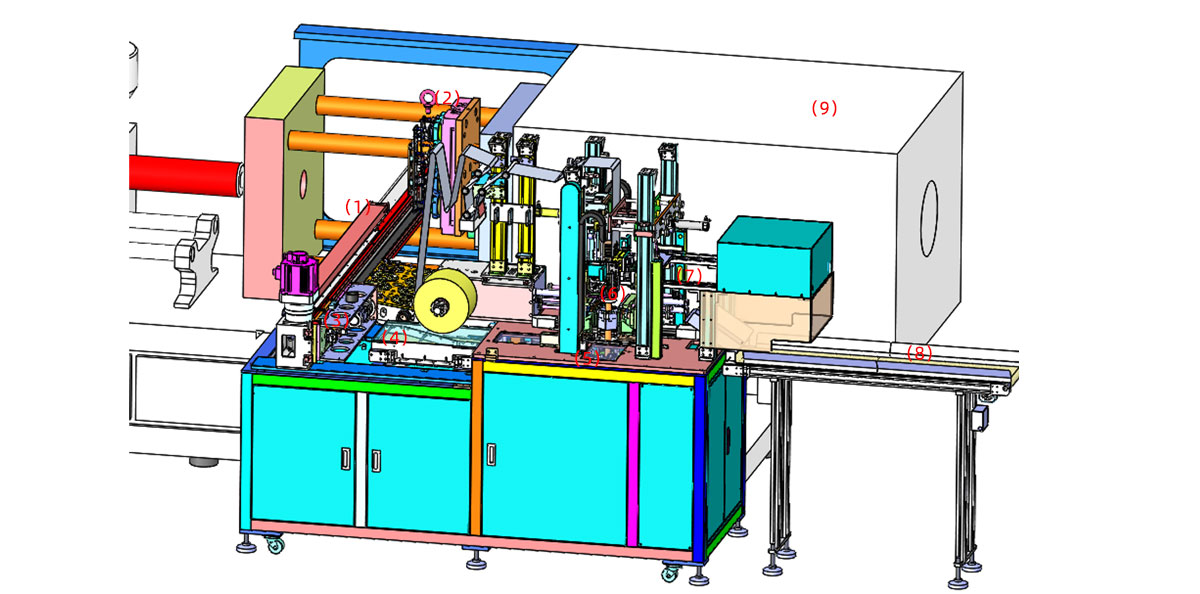
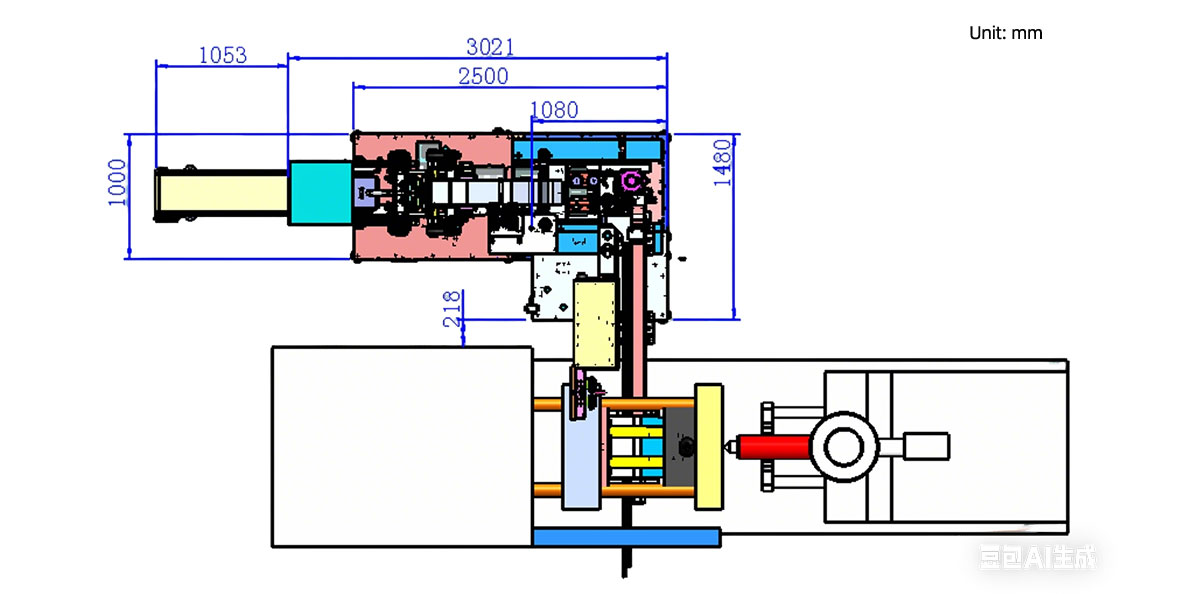
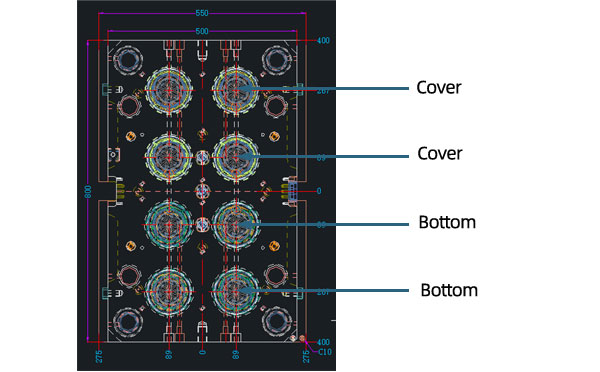
Mold Layout Deisgn
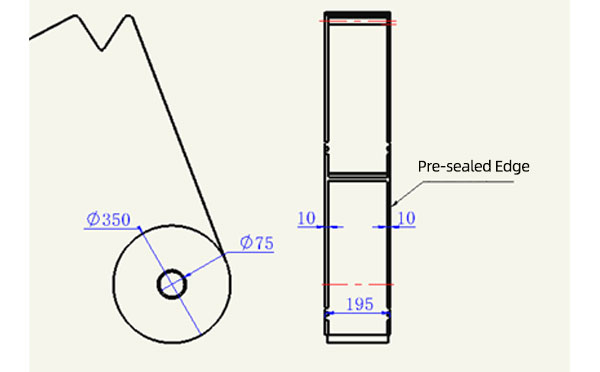
Sleeve Size for Package with Vacuum Request
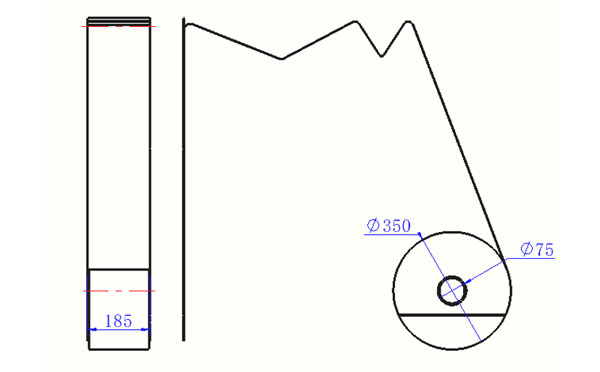
Sleeve Size for Package without Vacuum Request
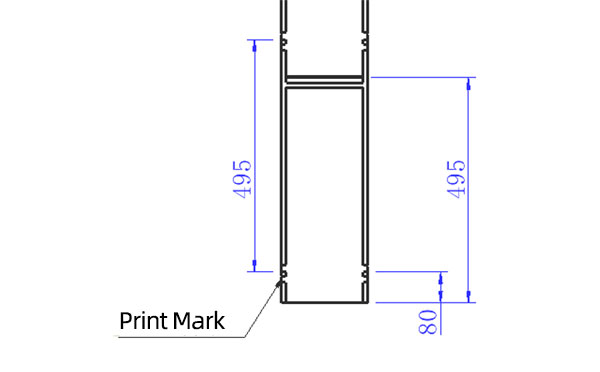
Sleeve (With Mark) Size for Package with Vacuum Request
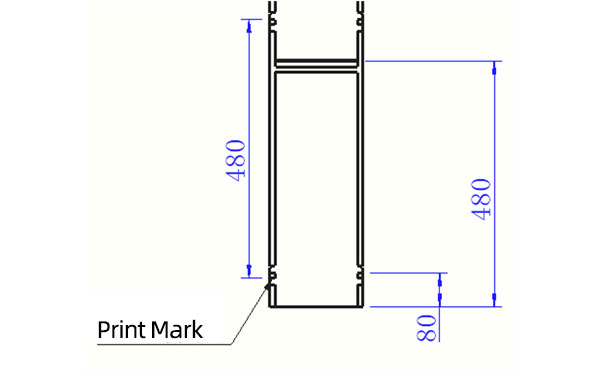
Sleeve (With Mark) Size for Package without Vacuum Request
I think you'll have an overall understanding about the SWITEK top/side entry petri dish packing system. If you still have any other question about it or need any help in your petri dish production project, please feel free to contact SWITEK laboratory consumable plastic parts injection molding solutions team for more information.
HuangYanZheng©Copy Right


