switek email

sales06@switek.biz

switek whatsapp

+86 186 5927 5869

Subscript to Us

.
14. How to Use the Front Panel — Parameter Setup Mode

HIGH SPEED IML ROBOT

Keywords:Panasonic A6 Servo Installation Instruction, Panasonic A6 Driver, Panasonic A6 Series Servo Motor Manual

14. How to Use the Front Panel — Parameter Setup Mode

Abstract

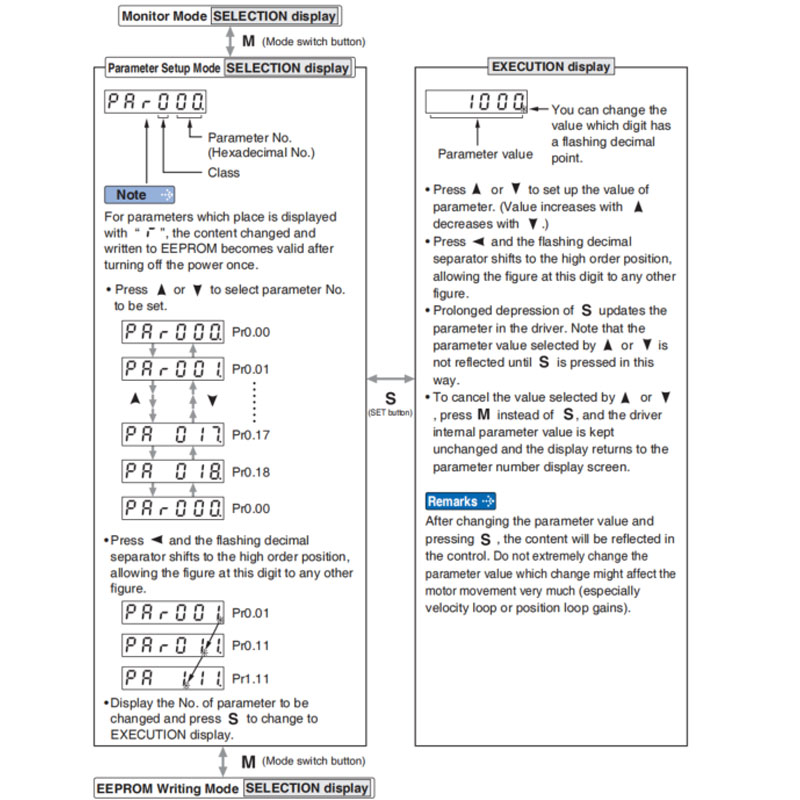
To change the monitor display setting, select the display option to be changed from " SELECTION display", and press S to change to " EXECUTION display". After completion of changing, press S to return to the selection display.
Panasonic A6 Servo Motor

Note → • After setting up parameters, return to SELECT mode, referring to structure of each mode (P.4-42).

• Each parameter has a limit in number of places for upper-shifting.
EEPROM Writing Mode
Panasonic A6 Servo Motor
Caution →
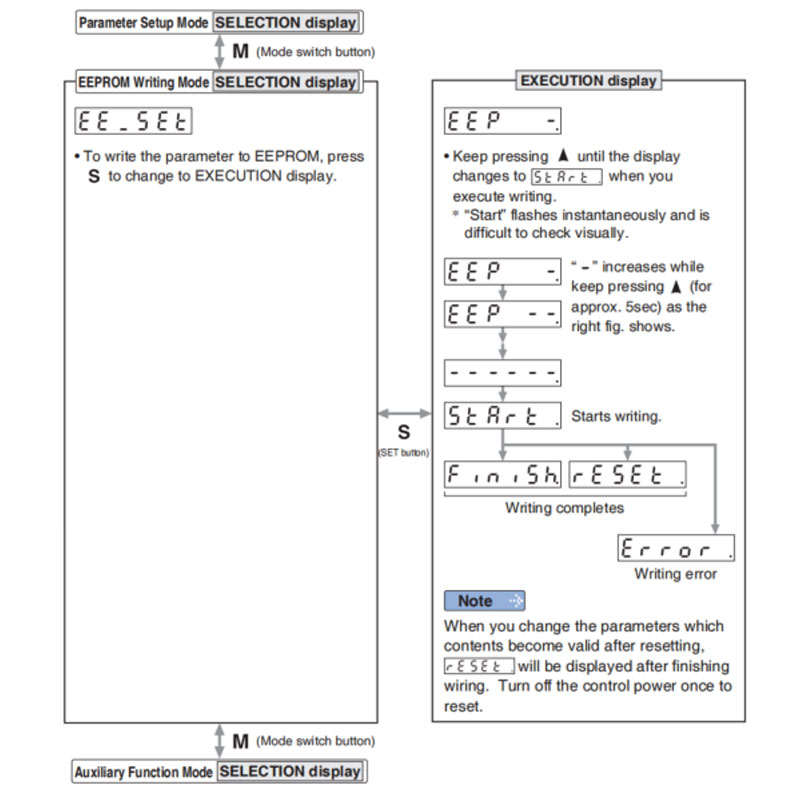
  1. When writing error occurs, make writing again. If the writing error repeats many times, this might be a failure.
  2. Don't turn off the power during EEPRM writing. Incorrect data might be written. If this happens, set up all of parameters again, and re-write after checking the data.
  3. When the error defined by Err11.0 "Under voltage protection of control power supply" occurs, ERROR. is displayed indicating that no writing is made to EEPROM.
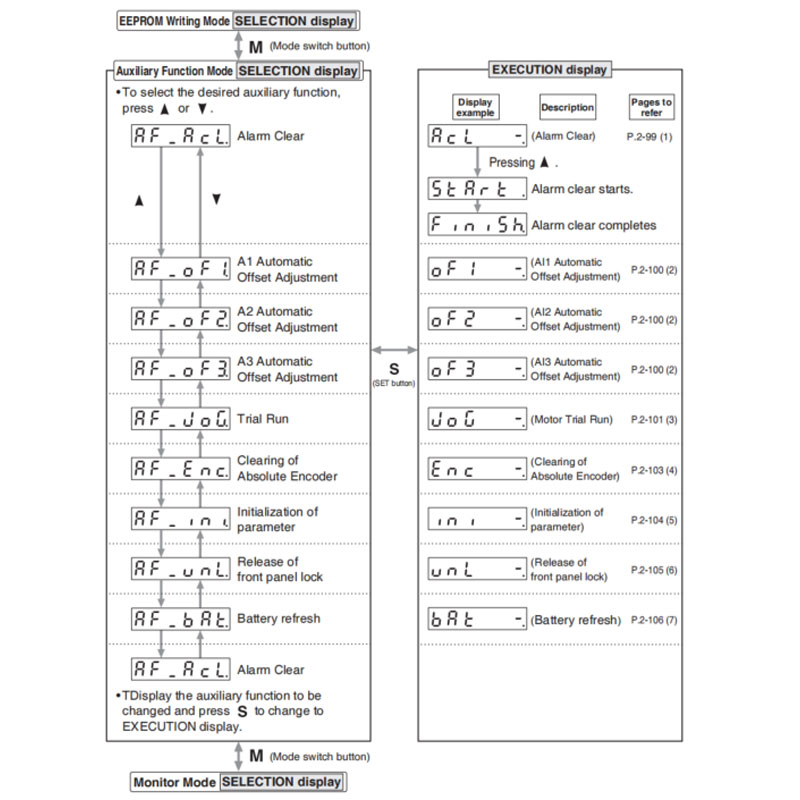
Auxiliary Function Mode (SELECTION display)
Panasonic A6 Servo Motor
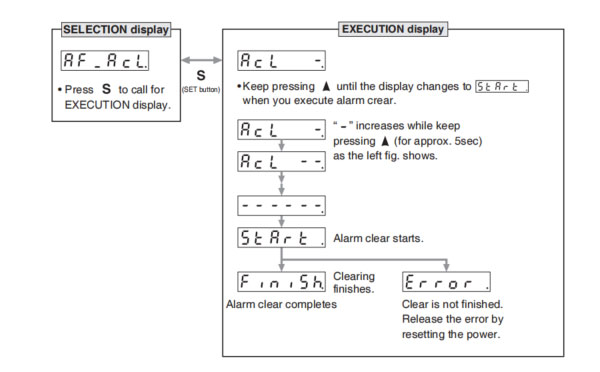
(1) Alarm Clear Screen

This function releases the current alarm status. Certain alarms will persist. If this is the case, refer to P.6-2 "When in Trouble - Protective Function".
Panasonic A6 Servo Motor

Note → • After alarm cleaning, return to SELECTION display, referring to structure of each mode (P.2-76).

(2) Analog inputs 1 to 3 automatic offset adjustment

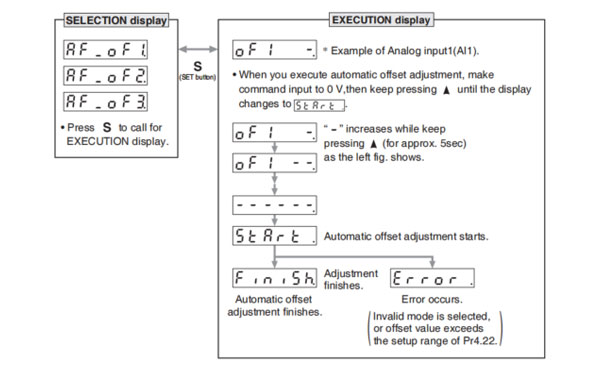
This function automatically ajusts offset setting of analog input.
Analog input 1 (Al1)……Pr4.22 (Analog input 1(Al1) offset setup)
Analog input 2 (Al2)……Pr4.25 (Analog input 2(Al2) offset setup)
Analog input 3 (Al3)……Pr4.28 (Analog input 3(Al3) offset setup)
Panasonic A6 Servo Motor

Remarks → • You cannot write the data only by executing automatic offset adjustment. Execute a writing to EEPROM when you need to reflect the result afterward.

Note → • After completion of the automatic offset adjustment, return to SELECTION display by referring to P.2-76 "Structure of Each Mode".

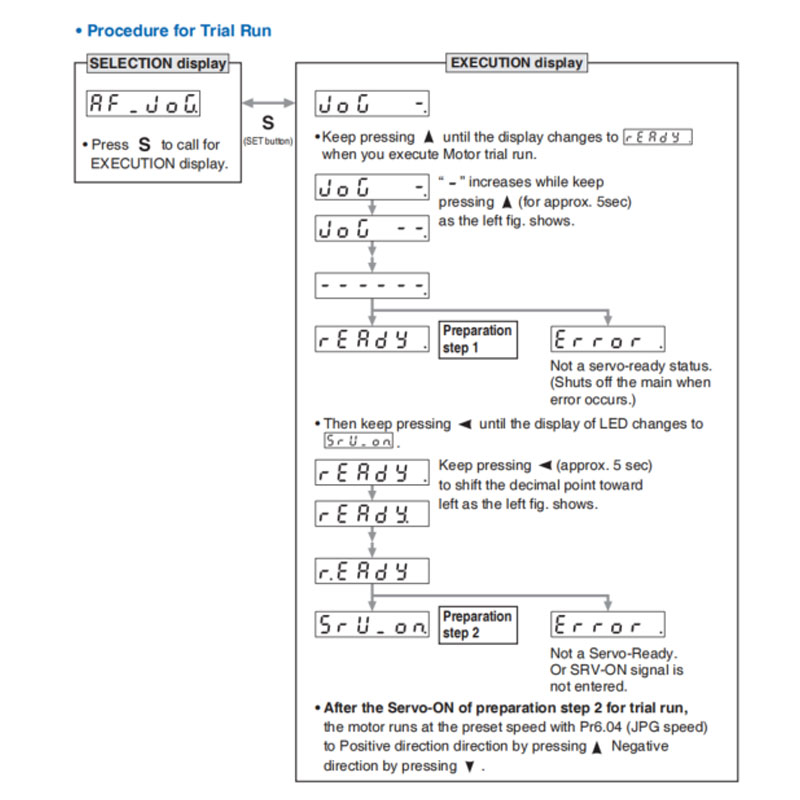
(3) Motor trial run

You can make a trial run (JOG run) without connecting the Connector, Connector X4 to the host controller such as PLC.

Remarks →
  • Separate the motor from the load, detach the Connector, Connector X4 before the trial run.
  • Bring the user parameter setups (especially Pr0.04 and Pr1.01 to 1.04) to defaults, to avoid oscillation of other failure.
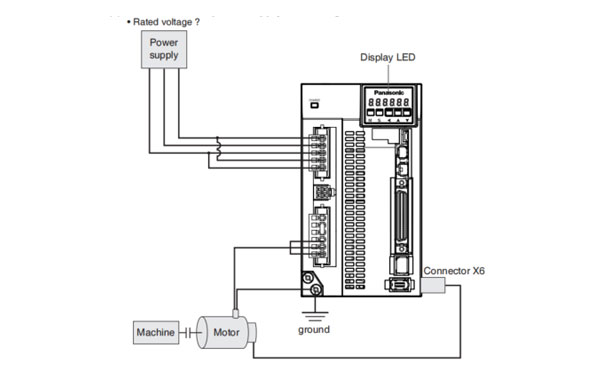
• Inspection Before Trial Run

(1) Inspection on wiring

(2) Confirmation of power supply and voltage

Panasonic A6 Servo Motor

Related page → •For wiring details, refer to P2-12 "Overall Wiring". • P.4-9 "Pr0.04" •P.4-16 "Pr1.01 to 1.04"

• Inspection Before Trial Run
Panasonic A6 Servo Motor
Caution →
  • Befor starting the trial run, set the gain-related parameters to appropriate values to avoid problems such as oscillation. If the load is removed, be sure to set Pr0.04 "Inertia Ratio" to 0.
  • During the trial run, use the velocity control mode. Various settings including parameters should assure safety and positive operation under appropriate velocity control.
  • If SRV-ON becomes valid during trial run, the display changes to Error which is normal run through external command.
Note →
  • After finished trial running, return to SELECTION display, referring to structure of each mode (P.2-76).
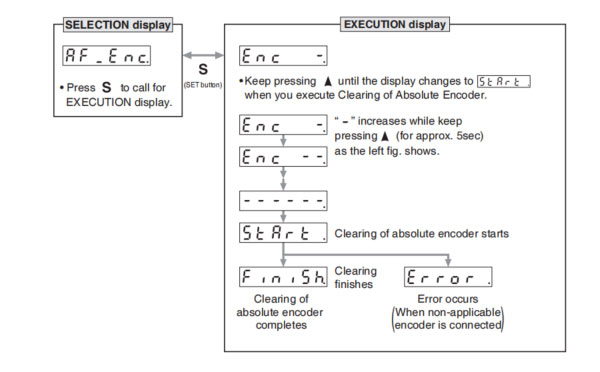
(4) Clearing of Absolute Encoder

You can clear multi-turn data of the absolute encoder.
Panasonic A6 Servo Motor

Note → • After clearing of absolute encoder finishes, return to SELECTION display, referring to structure of each mode (P.2-76).

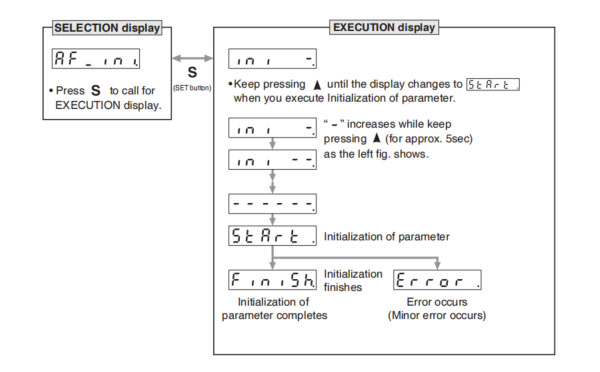
(5) Initialization of parameter

Initialize the parameter.

Panasonic A6 Servo Motor
Caution →
• Parameter cannot be initialized when one of the following error occurs: Err11.0 "Under voltage protection of control power supply", EEPROM related errors (Err36.0, Err36.1, Err36.2, Err37.0, Err37.1 and Err37.2) - initialization will result in "Error" display.

Note → • After initializeion of parameter finishes, return to SELECTION display, referring to structure of each mode (P.2-76).

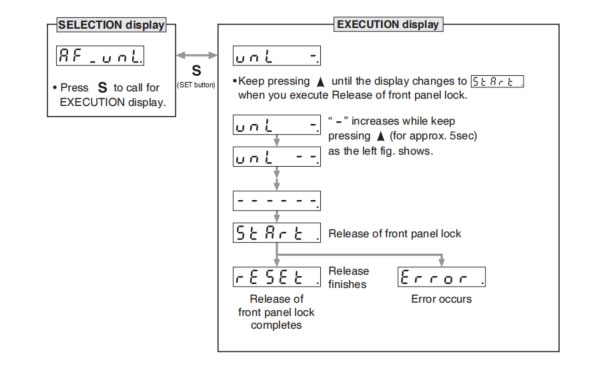
(6) Release of front panel lock

Release the front panel lock setting.
Panasonic A6 Servo Motor

Note → • After release of front panel lock finishes, return to SELECTION display, referring to structure of each mode (P.2-76).
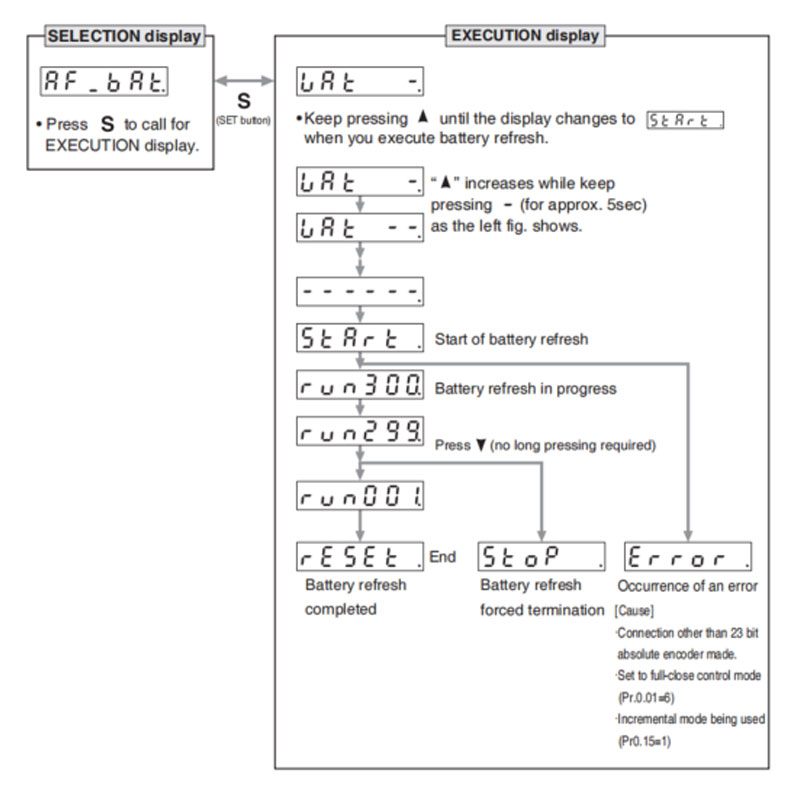
(7) Battery refresh

Battery refresh action is conducted.

Panasonic A6 Servo Motor

Note 1) When running Battery refresh, Battery alarm may occur in that case, please run the clear Battery alarm.


Note → • After release of front panel lock finishes, return to SELECTION display, referring to structure of each mode (P.2-76).


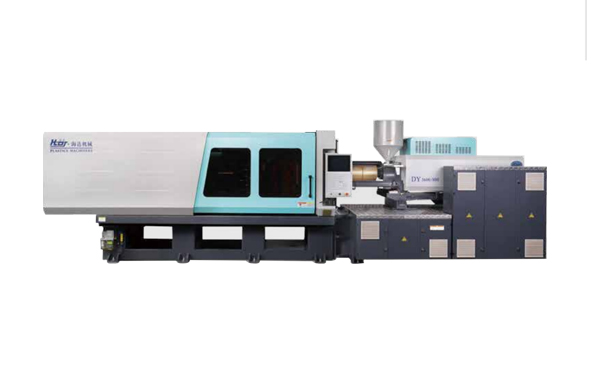
Hybrid Injection Molding Machine for Laboratory Consumable Petri Dish Injection Molding -- HD210LDY-B
Haida hybrid Injection Molding Machine
HD210LDY-B

HD210LDY -- HaiDa Hybrid Injection Molding Machine

No. Name Value
1 Clamping Force 2100 kN
2 Shot Weight 326 g
3 Shot Speed 200 mm/s
4 Screw Diameter 45 mm
5 Opening Stroke 500 mm
6 Space Between Tie Bars 530 x 530 mm
7 Mold Thickness (Min) 200 mm
8 Mold Thickness (Max) 550 mm
9 Pumper Motor 90 kW
10 Heating Capacity 16 kW

Injection Automation Application -- Side Entry Petri Dishs Injection Molding Automation Solution
petri dish packing solution

SIDE ENTRY PETRI DISH PACKING SOLUTION

Introduction of SWITEK Side Entry Petri Dish Packing System

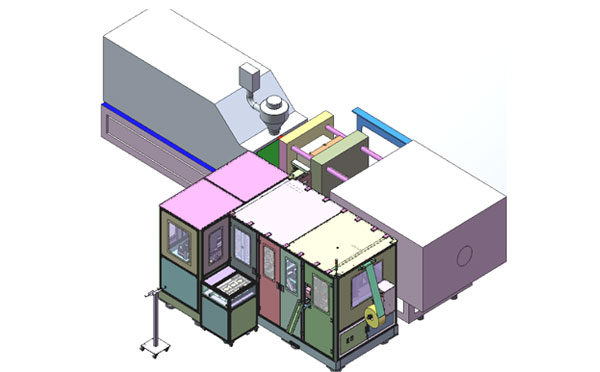
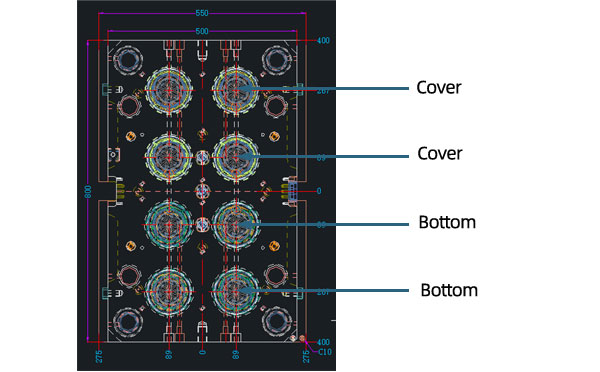
The SWITEK side entry petri dish packing system is a custom made automation system for the stable production of laboratory consumable plastic petri dish with the picking robot, the petri dish assembly, stacking, packing unit etc. integrated as auniformed system for the efficient and stable production of the petri dish. The system can be custome made for a petri dish mold layout design of 2+2, 4+4, 6+6, 8+8 etc.
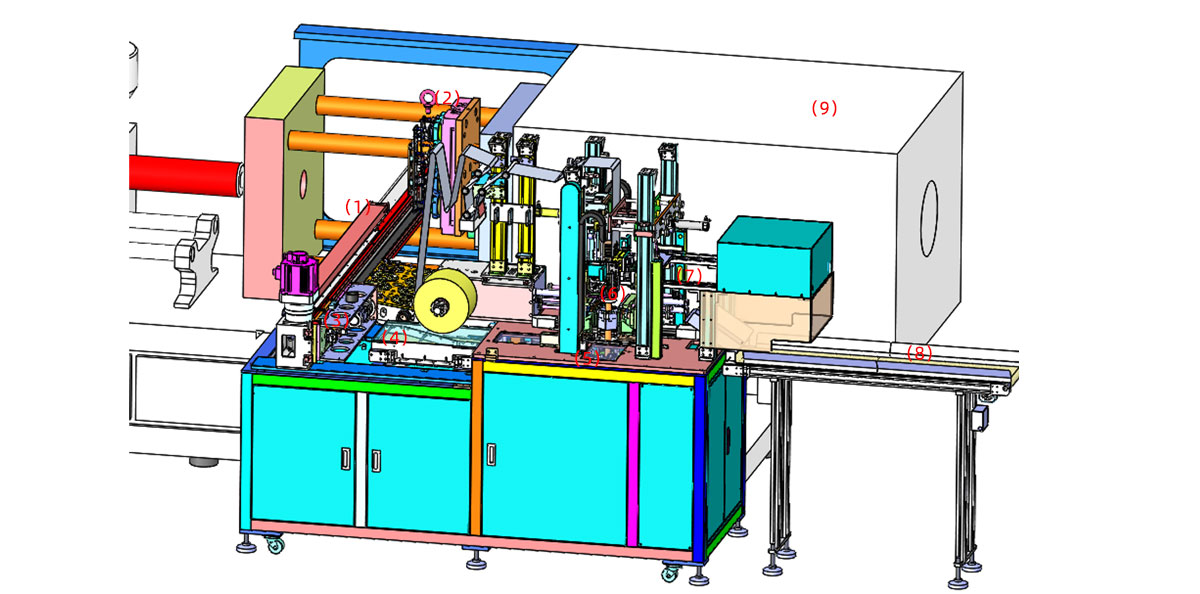
Functional Units of SWITEK Top Entry Petri Dish Packing System
petri dish packing solution
  • (1) -- Side Entry Robotic Arm: The picking arm of the packing system in handling the picking of the petri dish from the injection molding machine and place them on the assembly unit.
  • (2) -- Injection Mold: The core injection unit to shape the petri dish, it can be 2+2, 4+4, 6+6, 8+8 configuragion of the petri covers and bottoms.
  • (3) -- Petri Dish Assembly Unit: Have the cover and bottom of the petri dish assembled and drop it on the conveyor.
  • (4) -- Sorting Conveyor: Lined the assembled petri dish sets for stacking before packing.
  • (5) -- Stacking Station: Have the well assembled petri dishes stacked up as requested (5/10/15/20/25 sets etc.).
  • (6) -- Petri Dish Packing Unit: Have the well stacked petri dish packed and sealed with optional function of vacuume the bag.
  • (7) -- Petri Dish Transfer Robot: Catch the well sealed petri dish bag and drop it to the conveyor.
  • (8) -- Petri Dish Dropping Conveyor: Deliver the well packed petri dish.
  • (9) -- Injection Molding Machine: The injection unit of the whole syste.

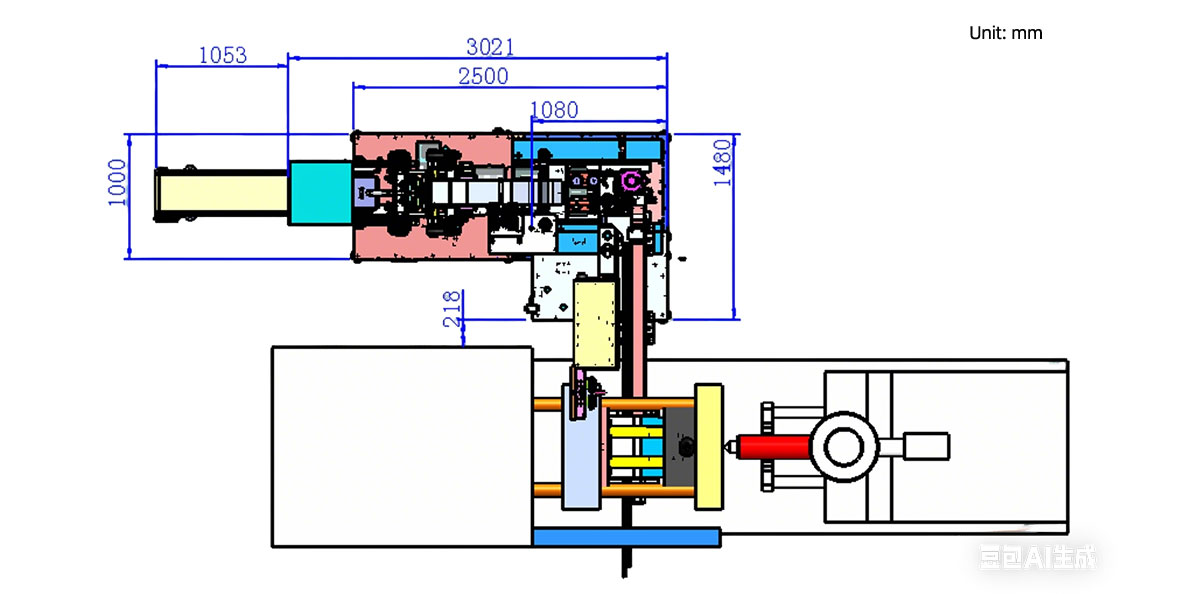
Installation Dimension of SWITEK Side Entry Petri Dish Packing System
petri dish packing solution

Productivity of SWITEK Side Entry Petri Dish Packing Solutions
    Vacuumed Sleeve Packing
  • 10 Sets/Bag --Injection Cycle time: 9s
  • 20 Sets/Bag --Injection cycle: 6s
  • 25 Sets/Bag --Injection Cycle: 5.5s
    Non-vacuumed Sleeve Packing
  • 10 Sets/Bag --Injection Cycle time: 6.5s
  • 20 Sets/Bag --Injection cycle: 6s
  • 25 Sets/Bag --Injection Cycle: 5.5s

Mold Layout Design & Sleeve Size for the Petri Dish Packing System
petri dish packing solution

Mold Layout Deisgn

petri dish packing solution

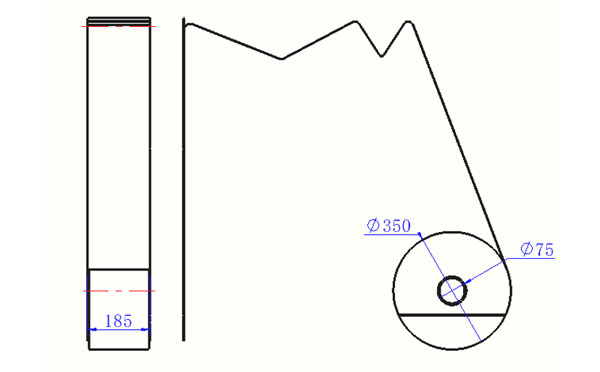
Sleeve Size for Package with Vacuum Request
petri dish packing solution

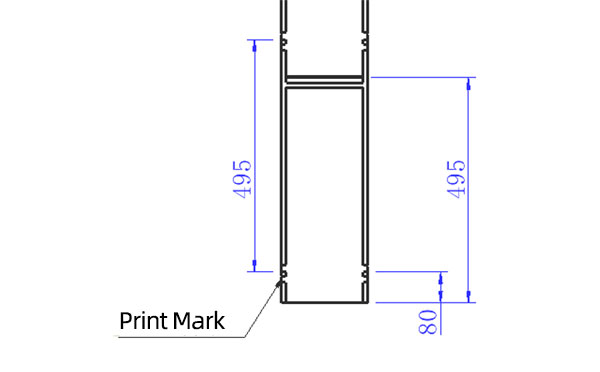
Sleeve Size for Package without Vacuum Request
petri dish packing solution

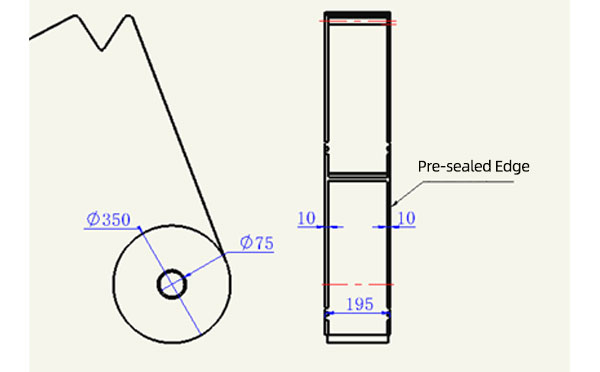
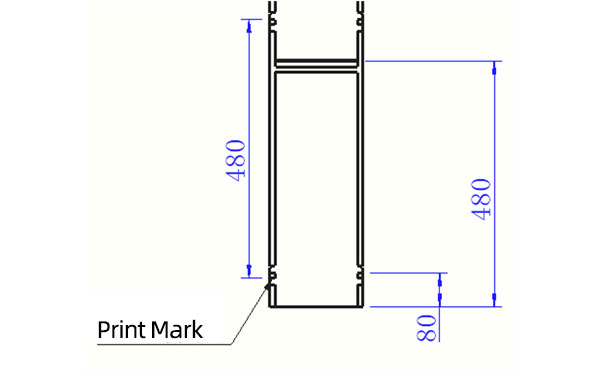
Sleeve (With Mark) Size for Package with Vacuum Request
petri dish packing solution

Sleeve (With Mark) Size for Package without Vacuum Request

I think you'll have an overall understanding about the SWITEK top/side entry petri dish packing system. If you still have any other question about it or need any help in your petri dish production project, please feel free to contact SWITEK laboratory consumable plastic parts injection molding solutions team for more information.


Email: sales06@switek.biz

WhatsApp

WeChat


Request for Quotation Now
Submit