
sales06@switek.biz

+86 186 5927 5869

Subscript to Us
sales06@switek.biz
+86 186 5927 5869
Subscript to Us

Keywords:Panasonic A6 Servo Installation Instruction, Panasonic A6 Driver, Panasonic A6 Series Servo Motor Manual
The correct setup of the parameter and mode of the Panasonic A6 series of servo will ensure the proper working of the Panasonic A6 series of motor and the stability of your machineries and automation system.
| Parameter No. | Title | Range | Default | Unit | Turning on of power supply | Related Control Mode | Detail page | ||||||
|---|---|---|---|---|---|---|---|---|---|---|---|---|---|
| Class | No. | A, B-frame | C-frame | D,E,F-frame | P | S | T | F | |||||
| 4 | 00 | Sl1 input selection (Pin No.8) | 0 to OOFFFFFFh | 8553090 | — | ○ | ○ | ○ | ○ | ○ | 4-39 | ||
| 4 | 01 | Sl2 input selection (Pin No.9) | 0 to 00FFFFFFh | 8487297 | — | ○ | ○ | ○ | ○ | ○ | 4-40 | ||
| 4 | 02 | Sl3 input selection (Pin no.26) | 0 to 00FFFFFFh | 9539850 | — | ○ | ○ | ○ | ○ | ○ | |||
| 4 | 03 | Sl4 input selection (Pin No.27) | 0 to 00FFFFFFh | 394758 | — | ○ | ○ | ○ | ○ | ○ | |||
| 4 | 04 | Sl5 input selection (Pin No.28) | 0 to 00FFFFFFh | 4108 | — | ○ | ○ | ○ | ○ | ○ | |||
| 4 | 05 | Sl6 input selection (Pin No.29) | 0 to 00FFFFFFh | 197379 | — | ○ | ○ | ○ | ○ | ○ | |||
| 4 | 06 | Sl7 input selection (Pin No.30) | 0 to 00FFFFFFh | 3847 | — | ○ | ○ | ○ | ○ | ○ | |||
| 4 | 07 | Sl8 input selection (Pin No.31) | 0 to 00FFFFFFh | 263172 | — | ○ | ○ | ○ | ○ | ○ | |||
| 4 | 08 | Sl9 input selection (Pin No.32) | 0 to 00FFFFFFh | 328965 | — | ○ | ○ | ○ | ○ | ○ | |||
| 4 | 09 | Sl10 input selection (Pin No.33) | 0 to 00FFFFFFh | 3720 | — | ○ | ○ | ○ | ○ | ○ | |||
| 4 | 10 | SO1 output selection (Pin No.10, 11) | 0 to 00FFFFFFh | 197379 | — | ○ | ○ | ○ | ○ | ○ | 4-41 | ||
| 4 | 11 | SO2 output selection (Pin No.34, 35) | 0 to 00FFFFFFh | 131586 | — | ○ | ○ | ○ | ○ | ○ | |||
| 4 | 12 | SO3 output selection (Pin No.36, 37) | 0 to 00FFFFFFh | 328964 | — | ○ | ○ | ○ | ○ | ○ | |||
| 4 | 13 | SO4 output selection (Pin No.38, 39) | 0 to 00FFFFFFh | 328964 | — | ○ | ○ | ○ | ○ | ○ | |||
| 4 | 14 | SO5 output selection (Pin No.12) | 0 to 00FFFFFFh | 460551 | — | ○ | ○ | ○ | ○ | ○ | |||
| 4 | 15 | SO6 output selection (Pin No. 40) | 0 to 00FFFFFFh | 394758 | — | ○ | ○ | ○ | ○ | ○ | |||
| 4 | 16 | Type of analog monitor 1 | 0 to 28 | 0 | — | ○ | ○ | ○ | ○ | 4-42 | |||
| 4 | 17 | Analog monitor 1 output gain | 0 to 214748364 | 0 | — | ○ | ○ | ○ | ○ | ||||
| 4 | 18 | Type of analog monitor 2 | 0 to 28 | 4 | — | ○ | ○ | ○ | ○ | ||||
| 4 | 19 | Analog monitor 2 output gain | 0 to 214748364 | 0 | — | ○ | ○ | ○ | ○ | ||||
| 4 | 20 | For manufacturer's use | — | 0 | — | ||||||||
| 4 | 21 | Analog monitor output setup | 0 to 2 | 0 | — | ○ | ○ | ○ | ○ | 4-44 | |||
| 4 | 22 | Analog input 1 (AI1) offset setup | -5578 to 5578 | 0 | 0.366 mV | ○ | ○ | ○ | ○ | ||||
| 4 | 23 | Analog input 1 (AI1) filter | 0 to 6400 | 0 | 0.01 ms* | ○ | ○ | ○ | ○ | ||||
| 4 | 24 | Analog input (AI1) overvoltage setup | 0 to 100 | 0 | 0.1 V* | ○ | ○ | ○ | ○ | ||||
| 4 | 25 | Analog input 2 (AI2) offset setup | -342 to 342 | 0 | 5.86 mV | ○ | ○ | ○ | ○ | ||||
| 4 | 26 | Analog input 2 (AI2) filter | 0 to 6400 | 0 | 0.01 ms* | ○ | ○ | ○ | ○ | ||||
| 4 | 27 | Analog input 2(AI2) overvoltage setup | 0 to 100 | 0 | 0.1V* | ○ | ○ | ○ | ○ | ||||
| 4 | 28 | Analog input 3 (AI3) offset setup | -342 to 342 | 0 | 5.86 mV | ○ | ○ | ○ | ○ | ||||
| 4 | 29 | Analog input 3(AI3) filter | 0 to 6400 | 0 | 0.01 ms* | ○ | ○ | ○ | ○ | 4-45 | |||
| 4 | 30 | Analog input 3(AI3) overvoltage setup | 0 to 100 | 0 | 0.1 V* | ○ | ○ | ○ | ○ | ||||
| 4 | 31 | Positioning complete (In-position) range | 0 to 2097152 | 10 | Command unit | ○ | ○ | ||||||
| 4 | 32 | Positioning complete (In-position) output setup | 0 to 10 | 0 | — | ○ | ○ | ||||||
| 4 | 33 | INP hold time | 0 to 30000 | 0 | 1 ms | ○ | ○ | 4-46 | |||||
| 4 | 34 | Zero-speed | 10 to 20000 | 50 | r/min | ○ | ○ | ○ | ○ | ||||
| 4 | 35 | Speed coincidence range | 10 to 20000 | 50 | r/min | ○ | ○ | ||||||
| 4 | 36 | At-speed (Speed arrival) | 10 to 20000 | 1000 | r/min | ○ | ○ | 4-47 | |||||
| 4 | 37 | Mechanical brake action at stalling setup | 0 to 10000 | 0 | 1 ms | ○ | ○ | ○ | ○ | ||||
| 4 | 38 | Mechanical brake action running setup | 0 to 10000 | 0 | 1 ms | ○ | ○ | ○ | ○ | ||||
| 4 | 39 | Brake release speed setup | 30 to 3000 | 30 | r/min | ○ | ○ | ○ | ○ | ○ | 4-48 | ||
| 4 | 40 | Selection of alarm output 1 | 0 to 28 | 0 | — | ○ | ○ | ○ | ○ | ||||
| 4 | 41 | Selection of alarm outpu 1 | 0 to 28 | 0 | — | ○ | ○ | ○ | ○ | ||||
| 4 | 42 | 2nd Position complete (In-position) range | 0 to 2097152 | 10 | Command unit | ○ | ○ | ||||||
| 4 | 44 | Position compare output pulse width setting | 0 to 32767 | 0 | 0.1 ms | ○ | ○ | ○ | 4-49 | ||||
| 4 | 45 | Position compare output polarity select | 0 to 63 | 0 | — | ○ | ○ | ○ | |||||
| 4 | 47 | Pulse output select | 0 to 7 | 0 | — | ○ | ○ | ○ | ○ | ○ | |||
| 4 | 48 | Position compare value 1 | -2147483648 to 2147483647 | 0 | Command unit | ○ | ○ | ||||||
| 4 | 49 | Position compare value 2 | -2147483648 to 2147483647 | 0 | Command unit | ○ | ○ | 4-50 | |||||
| 4 | 50 | Position compare value 3 | -2147483648 to 2147483647 | 0 | Command unit | ○ | ○ | ||||||
| 4 | 51 | Position compare value 4 | -2147483648 to 2147483647 | 0 | Command unit | ○ | ○ | ||||||
| 4 | 52 | Position compare value 5 | -2147483648 to 2147483647 | 0 | Command unit | ○ | ○ | ||||||
| 4 | 53 | Position compare value 6 | -2147483648 to 2147483647 | 0 | Command unit | ○ | ○ | ||||||
| 4 | 54 | Position compare value 8 | -2147483648 to 2147483647 | 0 | Command unit | ○ | ○ | ||||||
| 4 | 55 | Position compare value 8 | -2147483648 to 2147483647 | 0 | Command unit | ○ | ○ | ||||||
| 4 | 56 | Postion compare output delay compensation amount | -32768 to 32767 | 0 | 0.1µs | ○ | ○ | ○ | |||||
| 4 | 57 | Position compare output assignment setting | -2147483648 to 2147483647 | 0 | — | ○ | ○ | ○ | 4-51 | ||||
*1 Default settings depend on the combination of driver and motor. Refer to P.2-84 "Torque limit setting".
Caution → The symbol "*" attached to "Unit". indicates that the digits of setting unit change if the parameter is set by using the setup support software PANATERM.
Note → Parameter describes of this page is sP.4-6 to P.4-85.
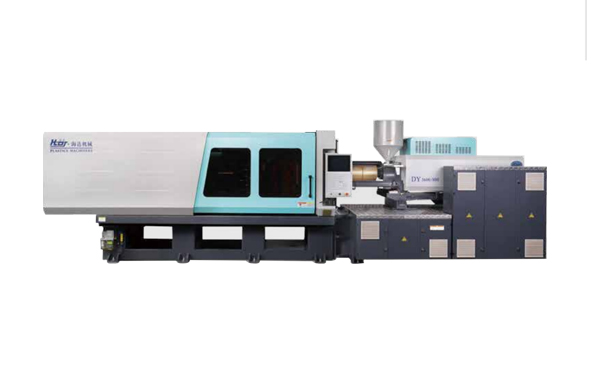
HD130LDY -- HaiDa Hybrid Injection Molding Machine
| No. | Name | Value |
|---|---|---|
| 1 | Clamping Force | 1300 kN |
| 2 | Shot Weight | 122 g |
| 3 | Shot Speed | 200 mm/s |
| 4 | Screw Diameter | 32 mm |
| 5 | Opening Stroke | 380 mm |
| 6 | Space Between Tie Bars | 420 x 420 mm |
| 7 | Mold Thickness (Min) | 150 mm |
| 8 | Mold Thickness (Max) | 450 mm |
| 9 | Pumper Motor | 49 kW |
| 10 | Heating Capacity | 7.5 kW |
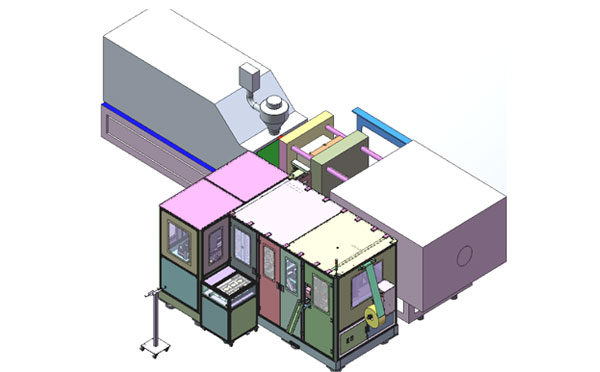
The SWITEK side entry petri dish packing system is a custom made automation system for the stable production of laboratory consumable plastic petri dish with the picking robot, the petri dish assembly, stacking, packing unit etc. integrated as auniformed system for the efficient and stable production of the petri dish. The system can be custome made for a petri dish mold layout design of 2+2, 4+4, 6+6, 8+8 etc.
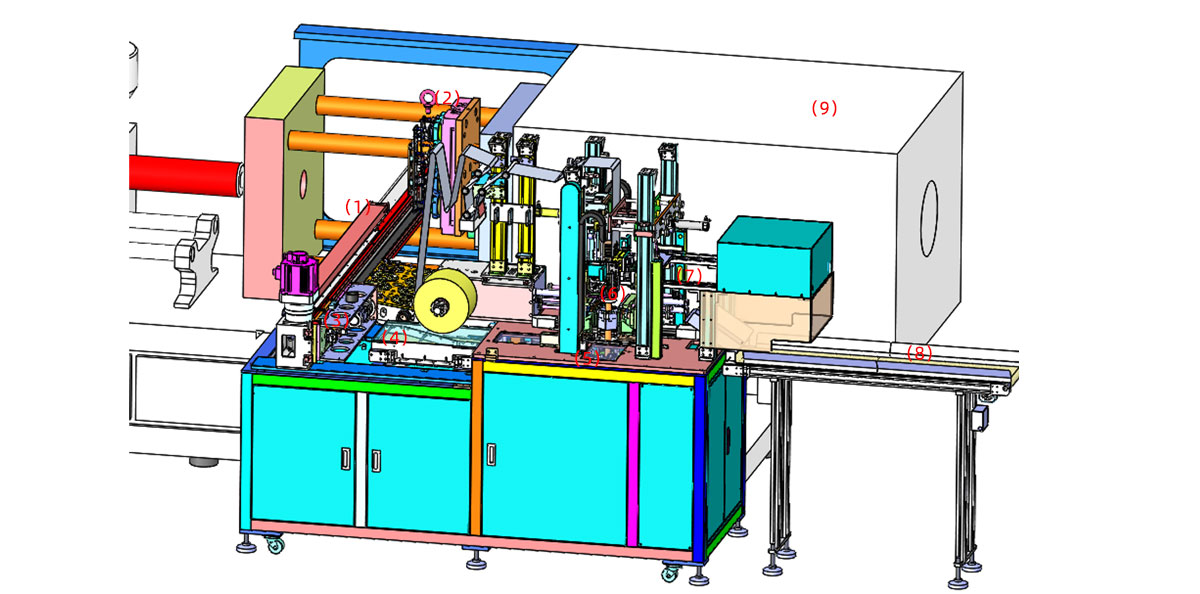
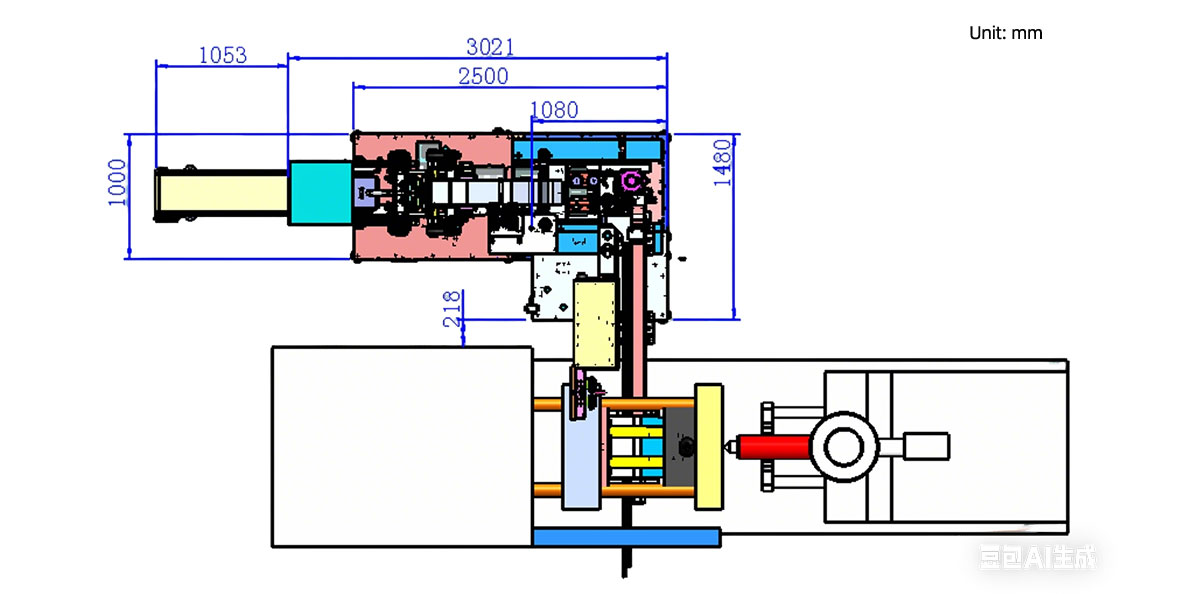
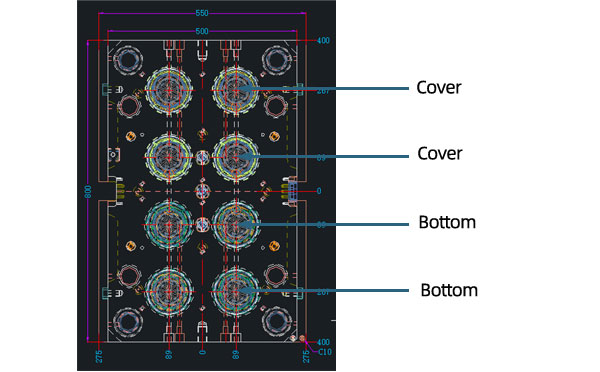
Mold Layout Deisgn
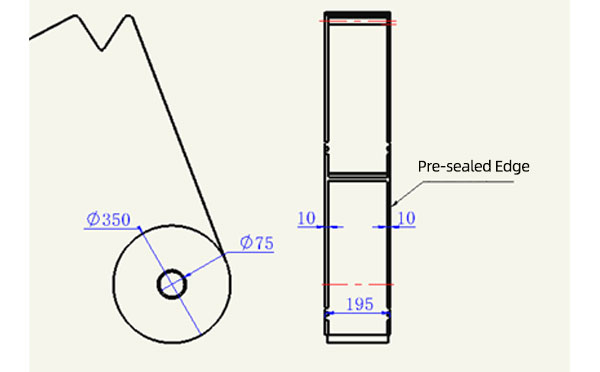
Sleeve Size for Package with Vacuum Request
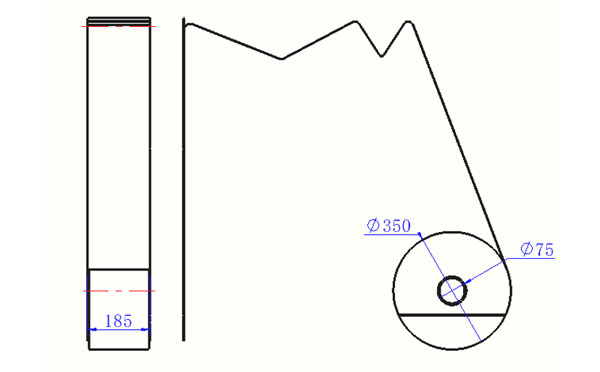
Sleeve Size for Package without Vacuum Request
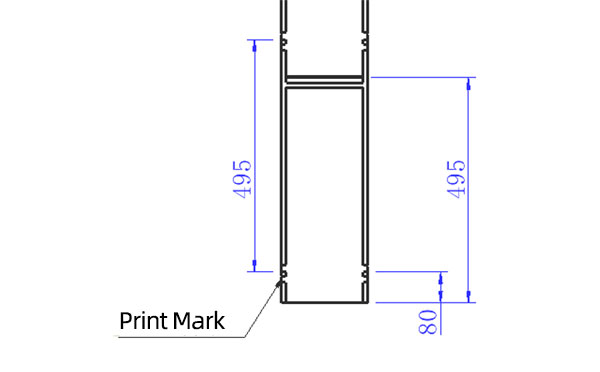
Sleeve (With Mark) Size for Package with Vacuum Request
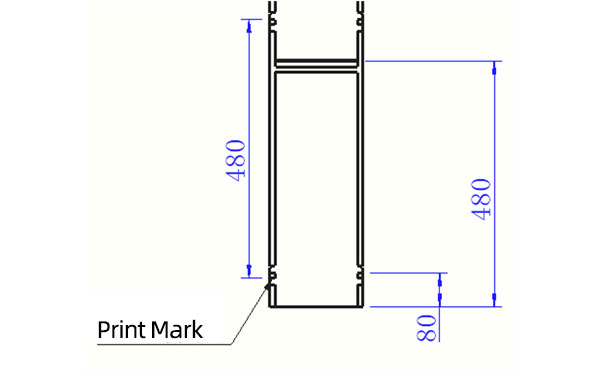
Sleeve (With Mark) Size for Package without Vacuum Request
I think you'll have an overall understanding about the SWITEK top/side entry petri dish packing system. If you still have any other question about it or need any help in your petri dish production project, please feel free to contact SWITEK laboratory consumable plastic parts injection molding solutions team for more information.
HuangYanZheng©Copy Right


